
Customs Notice 26-27: Introduction to the CBSA Assessment and Revenue Management (CARM) system’s generated Customs Tariff
Ottawa,
1. The Canada Border Services Agency (CBSA) wishes to advise of the upcoming changes to the publication formats of the Customs Tariff. Beginning with the next Customs Tariff amendment, which is expected to come into effect , the Customs Tariff will be published using files generated by the CBSA Assessment and Revenue Management (CARM) system. This change reflects the transition to CARM as the source system for the publication of the Customs Tariff.
PDF format
2. The layout of the Tariff will now be portrayed horizontally (landscape format) and will be clearly divided into columns.
3. Changes made to the Customs Tariff will no longer be indicated by a change bar in the left margin of the page, but rather by an “A” for additions, and a “C” for changes, both of which will appear in the “Change” column.
Example for “Additions” in the PDF version

Image description
In the first column to the left, two As are surrounded by a red box, indicating that classification number 8112.90.00.10, Germanium, and classification number 8112.90.00.20, Gallium, have been added to the new version of the Customs Tariff.
Example for “Changes” in the PDF version

Image description
In the first column to the left, a C is surrounded by a red box, indicating that classification number 8702.30.10.00, For the transport of 16 or more persons, including the driver, has been modified in the PDF version of the Customs Tariff.
4. Similarly, deletions will no longer be indicated by a change bar in the left margin. Instead, tariff items removed from the Customs Tariff will be provided in a concordance table format (Excel spreadsheet) published on the CBSA website for ease of reference.
Microsoft Excel
5. Microsoft Access files will be replaced by Microsoft Excel spreadsheets.
6. The type of information provided in the Excel spreadsheet will be the same as the information provided in the Access files. However, it will now be easier to determine what was changed because of the addition of the Effective date and Change columns.
7. Columns B and C of the spreadsheet indicate the description effective date (EFF_DATE_DESC) and the description change indicator (CHANGE_DESC). For example, if the description of a commodity has been modified, Column B will indicate the effective date of the change and Column C will show a “1” to indicate that a change was made.
Example of modifications to the Excel
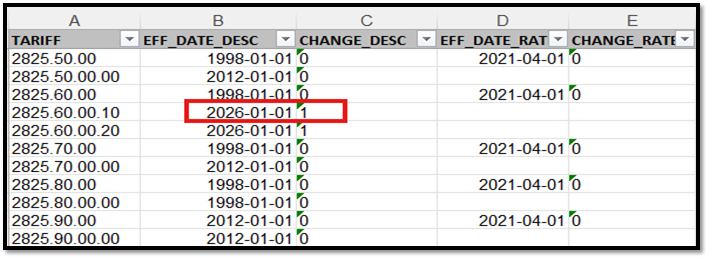
Image description
The image is a representation of an Excel Spreadsheet divided into five columns from A to E, each having a title on the first line as well as ten additional lines underneath containing data.
A red box surrounds the date 2026-01-01 found under column B named DATE_EFF_DESC to indicate the date on which the description associated with classification number 2825.60.00.10 was modified. This same red box also surrounds the number 1 found to the right of this date under column C named CHANGE_DESC to indicate that a change was made to the description associated with classification number 2825.60.00.10.
8. Columns D and E of the spreadsheet indicate the new rate effective date (EFF_DATE_RATE) and the rate change indicator (CHANGE_RATE). For example, if the rate associated with a commodity has been modified, Column D will indicate the effective date of the change and Column E will show a “1” to indicate that a change was made.
Example of modifications to the Excel
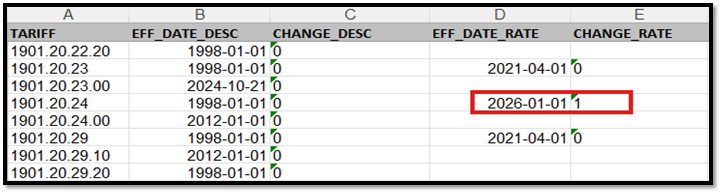
Image description
The image is a representation of an Excel Spreadsheet divided into five columns from A to E, each having a title on the first line as well as ten additional lines underneath containing data.
A red box surrounds the date 2026-01-01 found under column D named EFF_DATE_RATE to indicate the date on which the rate that applies to tariff number 1901.20.24 was modified. This same red box also surrounds the number 1 found to the right of this date under column E named CHANGE_RATE to indicate that a change was made to the rate associated with tariff number 1901.20.24.
9. Furthermore, additional description columns have been added to accommodate commodity descriptions that do not fit within the character limits.
Example of modifications to the Excel
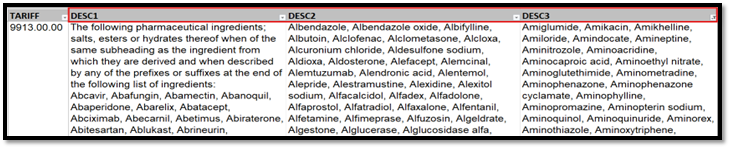
Image description
The image is a representation of an Excel Spreadsheet showing three columns named DESC1, DESC2, DESC3 surrounded by a red box. Under each of these columns, the line found underneath contains the description of the goods divided into three parts, as each line cannot contain all the information due to character limits.
HTML
10. There are no formatting changes in the HTML files.
11. For more information, contact the CBSA Border Information Service (BIS):
Calls within Canada & the United States (toll free): 1-800-461-9999
Calls outside Canada & the United States (long distance charges apply):
1-204-983-3550 or 1-506-636-5064
TTY: 1-866-335-3237
12. Contact Us online (webform)
13. Contact Us at the CBSA website may also be accessed for information.
Page details
- Date modified: